

Home > Apps > Communication > Sync for iCloud Email

| App Name | Sync for iCloud Email |
| Category | Communication |
| Size | 13.85M |
| Latest Version | 13.06 |
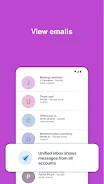
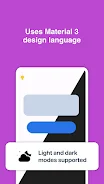
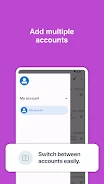


Experience effortless iCloud email management on your Android device with Sync for iCloud Mail! This dedicated app eliminates the need for manual synchronization, providing a streamlined way to access all your iCloud emails. Our secure, encrypted connection protects your login credentials, while the intuitive email viewer allows for easy reading and organization. Manage multiple iCloud, me.com, and mac.com accounts from a single inbox. Enjoy features like battery-saving dark mode and background syncing, all completely free. Upgrade your iCloud email experience today!
Key Features of Sync for iCloud Mail:
-
Automated Synchronization: Keep your inbox always up-to-date without lifting a finger. Never miss a crucial email again.
-
Intuitive Email Viewer: Access and read all your emails within one user-friendly application.
-
Secure Encrypted Connection: Your username and password are protected by our secure, encrypted connection to Apple's iCloud servers.
-
Multi-Account Support: Conveniently manage all your iCloud, me.com, and mac.com email accounts in one unified inbox.
-
Dark Mode: Conserve battery life and improve readability with our dark mode option.
-
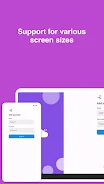
Versatile Compatibility: Enjoy seamless functionality on both phones and tablets, with split-screen support for larger devices.
In Summary:
Sync for iCloud Mail is the perfect solution for Android users who depend on iCloud for email. Its automated syncing, secure design, and user-friendly interface guarantee a smooth and efficient email experience. The ability to manage multiple accounts and the inclusion of dark mode further enhance its practicality. Download Sync for iCloud Mail now and unlock the full potential of your iCloud email on your Android device!
-
AlexTJan 30,26Been using this for a few weeks now to get my iCloud mail on Android. Works as advertised for basic inbox mgmt and sending. The interface is clean and simple. Maybe could use some more features like better calendar access, but for email it's solid. Does the job. 👍Galaxy Z Flip4
-
 Best MLB The Show 25 Diamond Dynasty Cards & Lineups (March 2025)
-
 Archero 2 Tier List – Ranking the Best Characters in February 2025
-
 Animal Crossing: Pocket Camp Complete - How to Unlock Lobo
-
 Epic Games Unveils Free Bridge Constructor: The Walking Dead and Idle Champions Rewards
-
 Veilguard DLC Delayed for Mass Effect 5
-
 Marvel vs Capcom 2 Original Characters May Show Up in Capcom Fighting Games