

Avowed: Optimal Settings for Motion Sickness Mitigation

Minimize Motion Sickness in Avowed: A Guide to Optimal Settings
Many first-person game players experience motion sickness. If Avowed is causing you discomfort, these settings can help.
Recommended Settings to Reduce Motion Sickness in Avowed
The primary culprits in first-person games, including Avowed, are head movement, field of view, and motion blur.
Removing Head Movement and Camera Shake
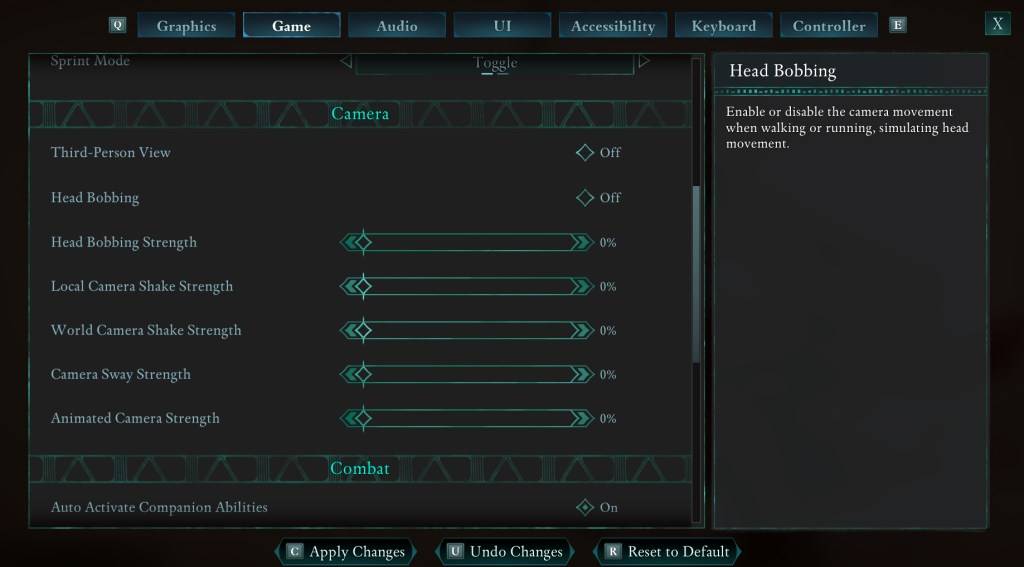
To address this, navigate to Settings > Game > Camera. Adjust the following:
- Third-Person View: Your preference (on or off).
- Head Bobbing: Off
- Head Bobbing Strength: 0%
- Local Camera Shake Strength: 0%
- World Camera Shake Strength: 0%
- Camera Sway Strength: 0%
- Animated Camera Strength: 0%
This configuration often significantly reduces motion sickness. Experiment with these settings to find the best balance between immersion and comfort.
Adjusting Field of View and Motion Blur
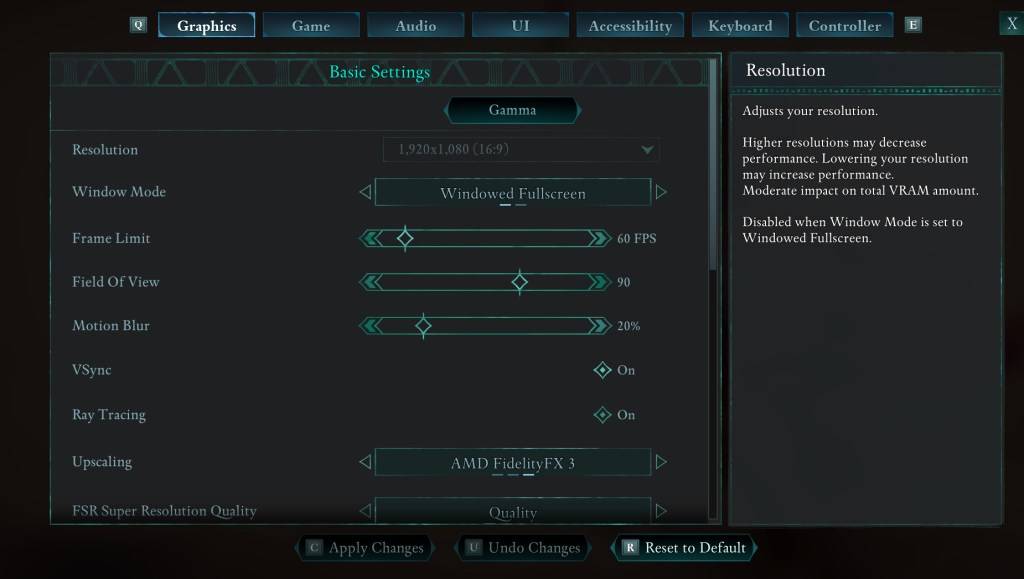
If eliminating head movement isn't sufficient, adjust the graphics settings:
- Field of View: Start with a low setting and gradually increase until you find a comfortable level. This may require several attempts.
- Motion Blur: Reducing or disabling motion blur often helps alleviate motion sickness. Try setting it to zero and adjust as needed.
Persistent Motion Sickness?
If motion sickness persists, continue fine-tuning the above settings and consider switching between first-person and third-person perspectives as needed. If all else fails, take a break, hydrate, and try again later. Don't force yourself to play if you're feeling unwell.
Avowed is currently available.
-
 Train King TycoonExperience stunning railroad dioramas in this immersive train simulation game!All aboard Transport King! Delight in beautifully crafted railroad dioramas within a realistic train simulation experience.Bridge the US East and West coasts across 150 yea
 -
 Words with Prof. WiselyJoin Prof. Wisely as you uncover hidden words and complete every crossword puzzle!Find words by linking letters together. Enhance your mindfulness, exercise your brain, and expand your vocabulary!This free game works offline. You can minimize or clos
 -
 Vector Ink: SVG, IllustratorCreate vector graphics in the cloud with intelligent design tools.Searching for the top vector graphic design application for Android? Your search ends here.Vector Ink simplifies your entire vector graphic design workflow.Vector Ink excels at graphic
 -
 Iron Muscle IV - GYM simulatorTrain your own bodybuilder and compete in professional bodybuilding championships.Iron Muscle is a bodybuilding simulation game where you design and train a virtual athlete in a detailed gym environment. You can fully customize your character's look
 -
 Guess & Find PRODecipher a hidden word based on its definition and then spot it on a letter grid!Uncover a secret word using its explanation and then locate it on a board filled with letters! Enjoy endless entertainment for the entire family! Guess & Find PRO is an
 -
 Anime Dragon Serie en LatinoDive into the captivating world of anime with the Anime Dragon Serie en Latino app, your destination for every episode of the Anime Dragon Series in Latin Spanish audio and high definition. Relive the thrilling moments that captured your imagination
-
 Best MLB The Show 25 Diamond Dynasty Cards & Lineups (March 2025)
-
 Animal Crossing: Pocket Camp Complete - How to Unlock Lobo
-
 Archero 2 Tier List – Ranking the Best Characters in February 2025
-
 Epic Games Unveils Free Bridge Constructor: The Walking Dead and Idle Champions Rewards
-
 Veilguard DLC Delayed for Mass Effect 5