

Fortnite Mobile: How to Buy Skins with V-Bucks
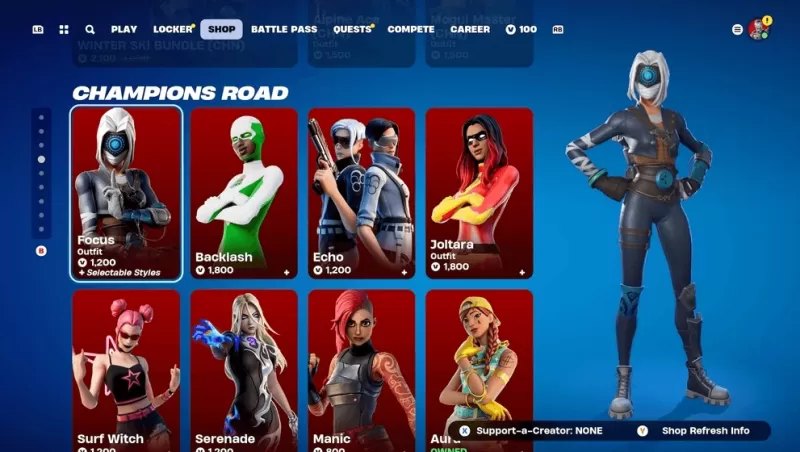
Here's how to play Fortnite Mobile on your Mac! Begin with our complete guide on using BlueStacks Air for Fortnite Mobile on macOS.
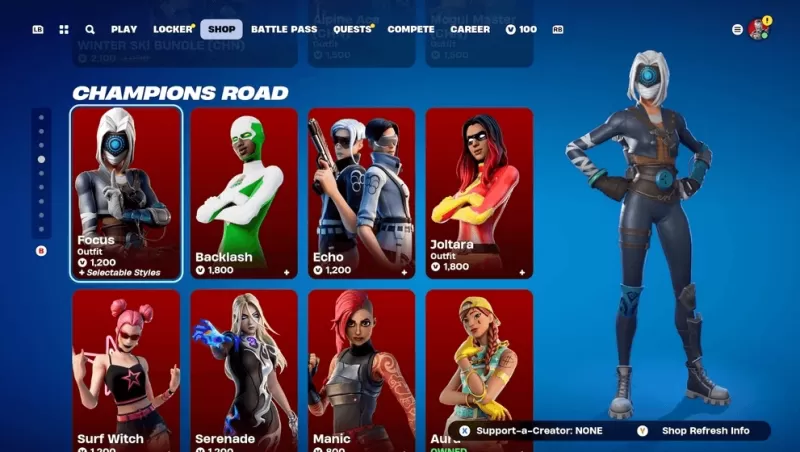
Fortnite Mobile is a widely popular battle royale and sandbox survival game from Epic Games. The Fortnite Item Shop serves as the in-game marketplace where players can buy cosmetic items to personalize their characters and enhance their gameplay. It updates daily with a rotating assortment of skins, emotes, harvesting tools, and other accessories. This guide offers a full overview of the Item Shop's mechanics: what you can purchase, how to obtain V-Bucks, and how to plan your spending effectively.
How to Access the Item Shop
Getting into the Item Shop is straightforward:
Launch Fortnite on your chosen device (PC, console, or mobile).From the main menu, find and select the Item Shop tab.Look through the current items, organized by category and bundle deals.Choose an item to see more details and buying options.
The Item Shop refreshes every day at 00:00 UTC, so new items are added and older ones may cycle out.
Strategies for Smart Shopping
Check the Daily Updates – With the shop changing every 24 hours, regular visits prevent you from missing limited-time offers.Save for Exclusive & Event Skins – Some rare skins tied to special events might not reappear for a long time.Think About the Battle Pass – The Battle Pass typically gives more value per V-Buck compared to individual purchases.Watch for Bundles – Packs often include items at a lower total price than buying them separately.Use Prediction Tools – If you're hoping for a specific item, third-party tracking sites can give you a heads-up.
The Fortnite Item Shop is central to personalizing your game, offering a fresh mix of skins, emotes, and cosmetics each day. By learning how the shop works, earning and spending V-Bucks wisely, and applying smart shopping habits, players can maximize their investment and enjoy a custom Fortnite experience. Mac users should refer to our Download Guide for correct Fortnite installation. Have fun playing Fortnite Mobile on PC or laptop via BlueStacks!
-
 New AgeNew Age is an epic online, real-time RPG, filled with powerful magic and intense combat.New Age is a multiplayer online RPG that blends tactical elements with a thrilling atmosphere. In this world, your success is determined by your ability to craft
 -
 트릭컬 리바이브A heartfelt ball-tagging adventure! #trickcurl #cheekpluck #Trickcal♥ Adorable! A charming Tactical Tag Life! ♥"Elias," a world shaped by the great World Tree.Diverse races thrive under the Tree's benevolent protection!A sudden leader of a world-span
 -
 Mad Wasteland: Last ExodusA brutal sci-fi post-apocalyptic survival shooter blending real-time 3D combat, horror, and roleplaying.War… War never changes.It started with a whisper, a shadow passing before the stars. The invasion struck without warning—an extraterrestrial force
 -
 MOONVALE - Detective StoryDelve into an authentic criminal case brimming with mystery, love, and romance to solve.Put your detective skills to the test. Gather clues and evidence to crack a gripping murder case. This contemporary murder mystery is more than a story—it's *your
 -
 Dungeon Hunter 6An epic action RPG bursting with loot, intense boss fights, diverse gear, and endless dungeon crawling.Dungeon Hunter Returns!The Thrilling Gameloft ARPG Sequel Is Here!Gather, bold Bounty Hunters, and charge into Dungeon Hunter VI—a spectacular hack
 -
 Flame of Valhalla GlobalImmerse yourself in a Nordic fantasy open-world MMO! Download now to claim exclusive Limited-Time Skins!Download is live! Log in to receive special outfits, mounts, and pets, plus an entry to win an Apple Vision Pro.Long ago, in the mystical realm of
-
 Best MLB The Show 25 Diamond Dynasty Cards & Lineups (March 2025)
-
 Archero 2 Tier List – Ranking the Best Characters in February 2025
-
 Animal Crossing: Pocket Camp Complete - How to Unlock Lobo
-
 Epic Games Unveils Free Bridge Constructor: The Walking Dead and Idle Champions Rewards
-
 Veilguard DLC Delayed for Mass Effect 5