

Mastering Ambush Hitting in MLB The Show 25

Gamers stepping up to the plate in MLB The Show 25 are always on the lookout for an edge over the competition, and fortunately, the talented team at San Diego Studio has delivered just that. Introducing Ambush Hitting—a game-changing feature available in every at-bat throughout the game. Essentially, it gives batters the ability to predict where the next pitch will come from, with the reward being a larger Plate Coverage Indicator (PCI) and a more generous timing window. This is particularly advantageous when facing tough pitchers who tend to crowd one side of the plate. However, it’s crucial to use this tool strategically and not rely on it exclusively.
How to Use Ambush Hitting in MLB The Show 25
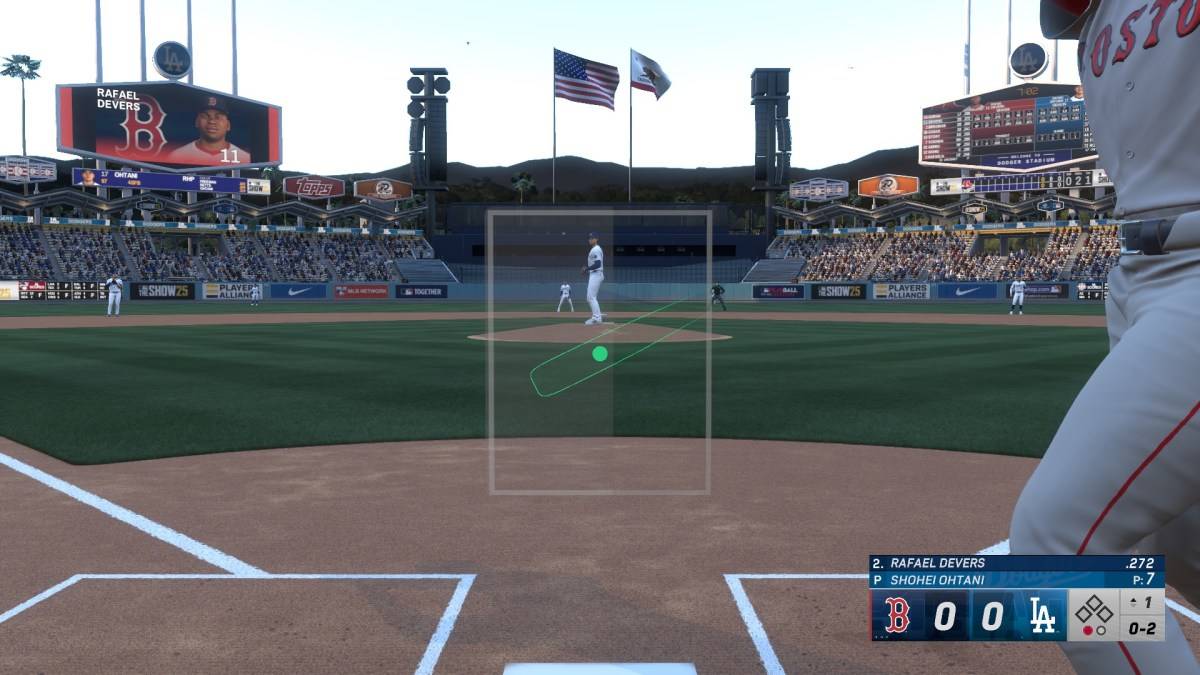
Ambush Hitting controls appear at the bottom of the screen during an at-bat in MLB The Show 25. By moving your right stick to the left, you can target the left side of the plate, while moving it to the right focuses on the right side. The selected side will turn gray, giving you a clear visual of how much of the plate is covered under the Ambush Hitting zone. Keep in mind, though, that if the pitch isn’t within this zone, you can still swing or take it—but you won’t benefit from the enhanced PCI or timing window.
At first glance, it might seem ideal to use Ambush Hitting on every pitch, but remember, unpredictability is key in baseball. Much like real-life pitchers, gamers in MLB The Show 25 thrive on variety. Therefore, the smartest approach is to develop a keen sense of the opponent’s pitch sequence. Once you recognize patterns, you can craft a strategy that incorporates Ambush Hitting effectively. While it may not always pay off and could lead to some frustrating outs, its strategic use can make all the difference between victory and defeat.
That’s your guide to mastering Ambush Hitting in MLB The Show 25. For more insights, check out whether you should pursue college or go pro in this year’s Road to the Show mode. MLB The Show 25 is currently available in Early Access on PlayStation 5 and Xbox Series X|S.
-
 GrimlightSummon legendary fantasy heroes and battle against the Dominion Lords.Awaken to a new beginning in a world of dreams and fairy tales. [Grimlight]The world of Phantasia is full of mystery and wonder, but it has been corrupted by the Dreamless—shadowy
 -
 ティンクルスターナイツ 変身ヒロインRPG!美少女ゲームHarness "Star Power"! Strong and beautiful heroines shine in this thrilling command battle RPG from DMM GAMES!Transforming heroines meet authentic tactical RPG gameplay! Lead a squad of unique, stunning heroines in strategic command battles!Develop y
 -
 Battle Ranker"I will become a top-ranked fighter and return to my own world!" An AFK RPG AdventureJust when you're attacked and left for dead by gangsters, you're suddenly transported to another world!In this strange new realm, a mysterious girl named Jenny Pink
 -
 EOL NextGenOnce A King, Always A KingEOL NextGen is a classic MMORPG mobile role-playing adventure.It's a faithful adaptation of the original PC version, enhanced with upgraded gameplay and experiences. It delivers a perfect blend of fresh excitement and nostal
 -
 Heavens' RevolutionMaster the secrets of arcane alchemy and spark a revolution in a Persian steampunk empire!In a Persian steampunk empire, will you use your arcane alchemy to repair a starship or command a battle-mech? Ignite an uprising, crush it, or manipulate both
 -
 YariImmerse yourself in captivating stories of romance and adventure with lifelike AI characters!Welcome to Yari, where AI-powered conversations feel astonishingly real. Step into a world of interactive entertainment and engage with dynamic characters in
-
 Best MLB The Show 25 Diamond Dynasty Cards & Lineups (March 2025)
-
 Archero 2 Tier List – Ranking the Best Characters in February 2025
-
 Animal Crossing: Pocket Camp Complete - How to Unlock Lobo
-
 Epic Games Unveils Free Bridge Constructor: The Walking Dead and Idle Champions Rewards
-
 Veilguard DLC Delayed for Mass Effect 5