

The Best Steam Deck Docking Stations to Connect to Your TV
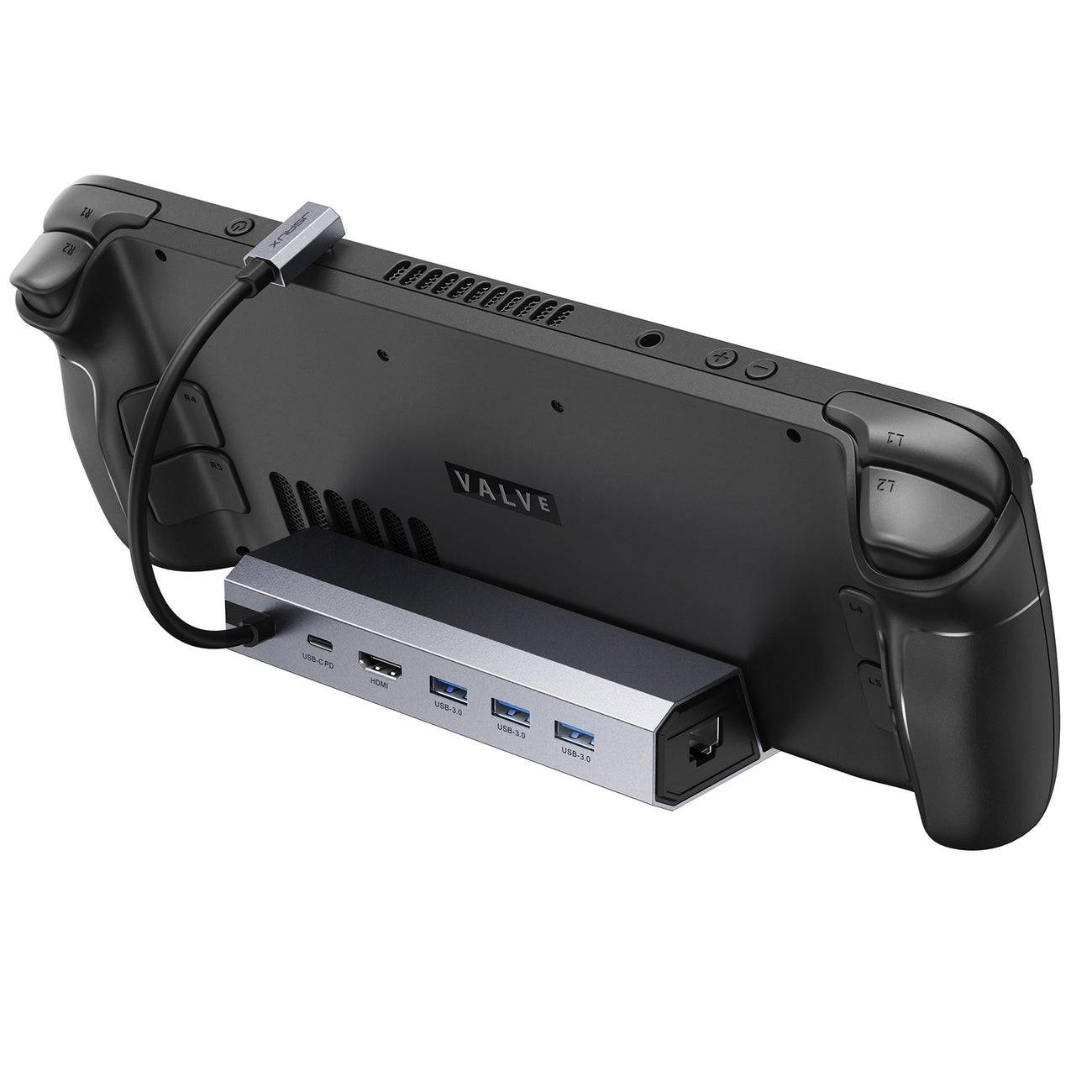
Enhance your Steam Deck experience with a docking station! Playing on a larger screen significantly improves immersion. This guide reviews the best Steam Deck docks in 2025, offering options for various budgets and needs. Most docks also support other handheld gaming PCs.
TL;DR - Best Steam Deck Docks:
 Our Top Pick: JSAUX Docking Station HB0603 (See it on Amazon!)
 Official Dock: Steam Deck Docking Station (See it on Steam!)
 Budget Pick: iVoler Docking Station (See it on Amazon!)
 Portable Pick: NewQ Steam Deck Dock (See it on Amazon!)
 Dual Monitor: MOKiN Dual Monitor Docking Station (See it on MOKiN!)
 Multi-Port: Park Sung Docking Station (See it on Amazon!)
 USB-C Hub: UGREEN USB-C Hub with Ethernet Port (See it on Amazon!)
 Durable Dock: NYXI 8 in 1 Docking Station (See it on NYXI!)
These docks simplify connecting your Steam Deck (or Steam Deck OLED) to gaming TVs or monitors, providing a desktop-like experience with extra ports for peripherals and power delivery. Many offer Ethernet for improved connectivity and DisplayPort for multi-monitor setups.
Detailed Reviews:
1. JSAUX Docking Station HB0603 - Best Overall:
- Pros: Affordable, fast charging (100W PD, though Steam Deck maxes at 45W), numerous ports (3x USB 3.0, USB-C, HDMI 2.0, Ethernet), compact and portable, doubles as a stand.
- Cons: Lacks DisplayPort.
2. Steam Deck Docking Station - Official Dock:
- Pros: Official Valve product, guaranteed compatibility, DisplayPort 1.4, HDMI 2.0, 3x USB 3.0, Ethernet.
- Cons: Expensive.
3. iVoler Docking Station - Best Budget:
- Pros: Affordable, HDMI 2.0 (4K@60Hz), USB-C for fast charging (65W PD), 3x USB 3.0, acts as a stand.
- Cons: No Ethernet port.
4. NewQ Steam Deck Dock - Best Portable:
- Pros: Extremely portable and lightweight, folds up, HDMI 2.0 (4K@60Hz), 100W PD, 2x USB-A 3.0.
- Cons: No DisplayPort or Ethernet.
5. MOKiN Dual Monitor Docking Station - Best for Dual Monitors:
- Pros: Supports dual monitors (DisplayPort 1.4 and HDMI 2.0, both 4K@60Hz), 100W fast charging, additional ports.
- Cons: Cable length could be improved.
6. Park Sung Docking Station - Best for Multiple Ports:
- Pros: Seven ports (3x USB 3.0, 2x USB-C, Ethernet, HDMI 2.0), stand doesn't block vents.
- Cons: A second dedicated charging USB-C would be beneficial.
7. UGREEN USB-C Hub with Ethernet Port - Best USB-C Hub:
- Pros: Versatile, works with various devices, 2x USB 3.0, 2x USB-C, HDMI 2.0, Ethernet, microSD and SD card readers.
- Cons: No dedicated Steam Deck docking mechanism.
8. NYXI 8 in 1 Docking Station - Most Durable:
- Pros: Durable build, angled USB-C cable, many ports (3x USB 3.1, PD 3.0, HDMI 2.0, DP 1.2, VGA, Ethernet), good heat dissipation.
- Cons: More expensive than most.
What to Look For:
Consider ports (USB-C for the Deck, USB-A for peripherals, HDMI 2.0 or DisplayPort 1.4 for displays, Ethernet), power delivery (at least 45W), and portability.
FAQ:
- Charging: Most docks charge the Steam Deck while docked. Ensure sufficient power delivery (45W minimum).
- Included Dock: No, docks are sold separately.
- TV Connection: While a dock is ideal, a USB-C to HDMI adapter works as an alternative.
-
 Train King TycoonExperience stunning railroad dioramas in this immersive train simulation game!All aboard Transport King! Delight in beautifully crafted railroad dioramas within a realistic train simulation experience.Bridge the US East and West coasts across 150 yea
 -
 Words with Prof. WiselyJoin Prof. Wisely as you uncover hidden words and complete every crossword puzzle!Find words by linking letters together. Enhance your mindfulness, exercise your brain, and expand your vocabulary!This free game works offline. You can minimize or clos
 -
 Vector Ink: SVG, IllustratorCreate vector graphics in the cloud with intelligent design tools.Searching for the top vector graphic design application for Android? Your search ends here.Vector Ink simplifies your entire vector graphic design workflow.Vector Ink excels at graphic
 -
 Iron Muscle IV - GYM simulatorTrain your own bodybuilder and compete in professional bodybuilding championships.Iron Muscle is a bodybuilding simulation game where you design and train a virtual athlete in a detailed gym environment. You can fully customize your character's look
 -
 Guess & Find PRODecipher a hidden word based on its definition and then spot it on a letter grid!Uncover a secret word using its explanation and then locate it on a board filled with letters! Enjoy endless entertainment for the entire family! Guess & Find PRO is an
 -
 Anime Dragon Serie en LatinoDive into the captivating world of anime with the Anime Dragon Serie en Latino app, your destination for every episode of the Anime Dragon Series in Latin Spanish audio and high definition. Relive the thrilling moments that captured your imagination
-
 Best MLB The Show 25 Diamond Dynasty Cards & Lineups (March 2025)
-
 Animal Crossing: Pocket Camp Complete - How to Unlock Lobo
-
 Archero 2 Tier List – Ranking the Best Characters in February 2025
-
 Epic Games Unveils Free Bridge Constructor: The Walking Dead and Idle Champions Rewards
-
 Veilguard DLC Delayed for Mass Effect 5